Outline Procreate Brushes - 3 Thickness
In the landscape of digital creativity, the difference between a rough sketch and a polished final asset often comes down to consistency. For professionals, hobbyists, and small business owners working on iPad, maintaining uniform line weights is a critical component of quality control. This is where Outline Procreate Brushes - 3 Thickness becomes an essential tool in your workflow. Designed specifically for the Procreate application, this brush pack addresses a common bottleneck in the creative process: the time spent manually adjusting line weight to ensure visual harmony.
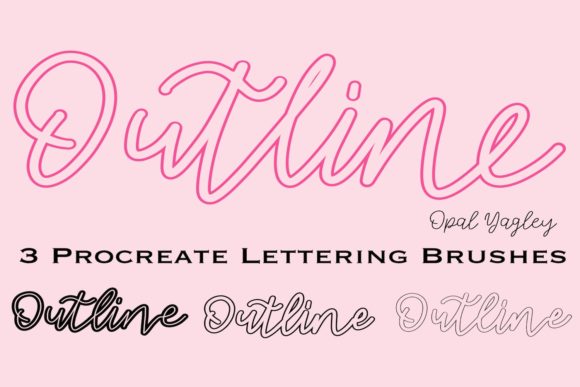
The core value of this resource lies in its simplicity and reliability. It provides three distinct variations—a Thin Outline Brush, a Medium Outline Brush, and a Thick Outline Brush—allowing creators to establish a clear visual hierarchy without the guesswork. Whether you are designing a logo, creating instructional content, or producing marketing materials, having immediate access to consistent outlines streamlines the execution phase significantly.
Understanding the Tool and Its Place in Your Workflow
To integrate Outline Procreate Brushes - 3 Thickness effectively, it is necessary to understand exactly what this tool is and how it functions within the broader ecosystem of digital design. Unlike dynamic brushes that react to pressure sensitivity, these brushes are static. They offer a fixed stroke width every time you draw, regardless of how hard you press with the Apple Pencil or your finger. This characteristic makes them ideal for tasks requiring precision and repeatability rather than organic variation.
In a typical project lifecycle, these brushes serve as the foundational layer. They fit into the planning and execution stages where structure is paramount. Before applying color, texture, or complex shading, a designer uses these outlines to define the boundaries of their work. By establishing these lines early, you create a roadmap that guides the subsequent steps of coloring and detailing. This approach reduces the cognitive load during the creative process, allowing you to focus on composition rather than technical adjustments.
The inclusion of three specific thicknesses allows for a nuanced approach to visual communication. The thin outline is perfect for delicate details, text overlays, or secondary elements that should recede slightly. The medium brush serves as the standard for general illustration and lettering, providing a balanced presence. The thick outline commands attention, making it suitable for headers, bold graphics, or decorative borders that need to anchor the design.
Compatibility and Technical Requirements
Before integrating this asset into your toolkit, verifying compatibility is a crucial step in the implementation process. These brushes are designed exclusively for the Procreate app on iPad devices. They do not function in Photoshop, Illustrator, or any other desktop-based software. Furthermore, they require an iPad, iPad Pro, or a compatible stylus environment to operate correctly.
A significant advantage of this specific pack is its independence from pressure sensitivity. While many professional artists rely on the subtle gradations provided by the Apple Pencil, this limitation here is actually a feature. Because the brushes are not pressure-sensitive, you can use your finger to draw if needed, or simply achieve a perfectly uniform line without worrying about hand tremors or variable pressure. This accessibility lowers the barrier to entry for users who may not have mastered advanced stylus techniques yet, while still delivering professional-grade results for experts.
Practical Implementation Strategies
Once you have installed the Outline Procreate Brushes - 3 Thickness, the next step is determining how to utilize them across different scenarios. The versatility of these tools extends beyond simple drawing; they are applicable in various professional and personal contexts.
- Lettering and Typography: For educators, bloggers, and social media managers, custom lettering is a powerful way to enhance engagement. These brushes allow you to create mono-outline lettering quickly. You can draft your message using the medium brush, add emphasis with the thick brush, and refine details with the thin brush. This creates a cohesive typographic style that looks intentional and polished.
- Iconography and UI Design: Entrepreneurs and product designers often need to create icons or interface elements. Consistency is key in user interface design. Using a single set of outline brushes ensures that every icon in your set shares the same line weight, resulting in a unified look that builds trust with your audience.
- Marketing Materials: Small business owners and marketers can use these brushes to create eye-catching flyers, Instagram stories, or email headers. The ability to switch between thicknesses rapidly allows for dynamic layouts that guide the viewer's eye through the content hierarchy.
- Instructional Content: Educators can leverage these tools to create diagrams and explanatory illustrations. The clean, unvarying lines make complex concepts easier to understand, as there is no visual noise from inconsistent strokes.
Optimizing Your Creative Process
Efficiency is a primary concern for productivity-minded users. Incorporating these brushes into your routine requires a slight shift in mindset regarding how you approach line work. Instead of starting with a light sketch and refining it, consider using the appropriate outline brush as your first pass. Select the thickness that best suits the element you are drawing and commit to that weight. This "commitment" strategy prevents the endless cycle of erasing and redrawing that often plagues digital artists.
Organization is another factor that impacts long-term success. Since the pack includes only three specific brushes, it is vital to keep your canvas organized. Create separate layers for each thickness level if you are working on a complex illustration. For example, place your thin outlines on one layer, mediums on another, and thicks on a third. This separation allows you to adjust the visibility or opacity of specific line weights later without affecting the rest of your artwork. It also facilitates easier editing if a client requests a change in the overall line weight of a specific section.
When working with clients or collaborators, the non-pressure-sensitive nature of these brushes ensures that the output remains consistent across different sessions. If you share a file with a colleague, they will see the exact same line weights you created, eliminating ambiguity. This reliability is particularly valuable in collaborative environments where multiple people might be contributing to the same project over time.
Quality Control and Long-Term Value
Maintaining high standards is essential for professionals who want to build a reputation for quality. The Outline Procreate Brushes - 3 Thickness supports quality control by removing variables that lead to inconsistency. In traditional art, even the most skilled artist struggles to draw two identical parallel lines. Digital tools like this bridge that gap, ensuring that your output meets professional specifications every time.
Furthermore, the instant download format means you can deploy these tools immediately when a project deadline approaches. There is no waiting for shipping or dealing with physical inventory. Once downloaded, the brushes are ready to use, fitting seamlessly into a fast-paced workflow. This immediacy is crucial for freelancers and entrepreneurs who often juggle multiple projects with tight turnaround times.
It is also important to note the limitations to manage expectations. As mentioned, these brushes do not work in Photoshop or other applications. If your workflow involves cross-platform collaboration where files are moved between desktop and mobile, you may need to convert your work or plan accordingly. However, for those deeply embedded in the iPad ecosystem, this is a non-issue. The trade-off for this exclusivity is a highly optimized experience within Procreate, where the brushes perform exactly as intended without the bloat of unnecessary features.
Maximizing Creative Potential
The ultimate goal of any tool is to amplify human creativity, not replace it. These brushes are designed to handle the structural heavy lifting so you can focus on the artistic vision. By automating the consistency of your outlines, you free up mental energy for decisions about color theory, composition, and storytelling. This shift allows you to produce higher-quality work in less time.
Whether you are a seasoned illustrator looking to streamline your process or a beginner eager to create professional-looking designs, Outline Procreate Brushes - 3 Thickness offers a practical solution. It embodies the principles of good design: clarity, consistency, and purpose. By integrating these tools into your daily routine, you align your workflow with industry standards and elevate the quality of your output.
Work with love and passion, as Opal Yagley suggests, but also work with intelligence and efficiency. Choosing the right tools is a strategic decision that pays dividends in the form of saved time and improved results. With the ability to switch between thin, medium, and thick outlines instantly, you gain the flexibility to adapt to any design challenge while maintaining the integrity of your visual language. Embrace this tool, experiment with its capabilities, and watch your creative projects reach new levels of polish and professionalism.