Scandinavian Abstract Procreate Stamps: A Practical Guide to Integrating Nordic Folk Art into Your Digital Workflow
In the modern digital landscape, where efficiency and aesthetic consistency are paramount, finding tools that bridge the gap between traditional craftsmanship and rapid digital execution is essential. Scandinavian Abstract Procreate Stamps offers a specialized solution for creators who need to inject authentic Nordic character into their projects without spending hours hand-drawing intricate patterns from scratch. This resource is not merely a collection of images; it is a functional asset designed to streamline the creative process for professionals, entrepreneurs, and hobbyists alike.
The core value of this tool lies in its specificity. It is built exclusively for the iPad ecosystem using the Procreate 5X application. Unlike generic brush packs that claim cross-platform compatibility, these brushes require the native environment of Procreate 5X and an Apple Pencil to function correctly. This limitation is actually a feature for workflow optimization, as it ensures high-fidelity performance, pressure sensitivity, and stroke smoothing that cannot be replicated in desktop software like Photoshop or Illustrator. For users operating within the mobile-first design workflow, this specificity guarantees a seamless integration into daily tasks.
Understanding the Asset and Its Place in the Creative Process
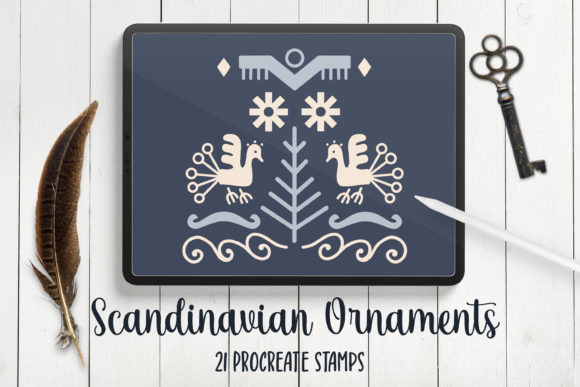
To effectively utilize Scandinavian Abstract Procreate Stamps, one must first understand what the asset represents. The set includes 21 digitally hand-drawn stamp brushes inspired by Scandinavian folk art. These are not vector shapes or static PNGs; they are dynamic brushes that mimic the texture and imperfection of physical stamps while offering the flexibility of digital layers. The designs draw upon the rich heritage of Nordic ornamentation, characterized by clean lines, geometric symmetry, and stylized floral motifs.
This distinction matters significantly when planning a project. If your workflow involves moving files between different software suites, such as exporting from Procreate to Adobe Creative Cloud for final layout, understanding the format is crucial. Because these are Procreate-specific brushes, they are best utilized during the ideation, sketching, and intermediate design phases within the iPad app. They serve as a powerful catalyst for brainstorming sessions, allowing designers to rapidly test compositions before committing to a final vector trace or detailed illustration.
The set comes as a single .BRUSHSET file contained within a ZIP archive. While the delivery format is standard, the implementation requires a specific sequence of actions on the iPad. Users must unzip the file and import it directly into the Procreate library. Once imported, the brushes become part of the user's permanent toolkit, ready to be accessed via the Brush Studio. This setup process is a critical step in preparation; skipping the proper import procedure can lead to missing assets or functionality issues later in the project lifecycle.
Strategic Use Cases Across Different Industries
The versatility of these stamps allows them to fit into a wide array of professional and personal workflows. For small business owners and marketers, branding consistency is often the most time-consuming aspect of identity development. Using Scandinavian Abstract Procreate Stamps can accelerate the creation of brand assets. Imagine designing a logo concept for a boutique coffee shop with a rustic theme. Instead of manually drawing the decorative borders, you can use the stamp brushes to create unique frames around the typography instantly. This allows for rapid iteration, enabling the client to visualize multiple directions before the final design is locked in.
For educators and content creators, these brushes offer a way to produce high-quality visual materials quickly. Teachers creating worksheets, bloggers designing featured images, or influencers crafting Instagram stories can leverage these assets to add a layer of sophistication to their content. The ability to create decorative borders and frames means that text-heavy content can be visually broken up without cluttering the design. In a busy production schedule, the ability to drag and drop a pre-made ornamental element rather than building it from scratch saves valuable minutes that can be redirected toward strategy or copywriting.
Hobbyists and stationery designers find particular utility in this set for creating personalized greeting cards and invitations. The "stamp" nature of the brushes implies a tactile quality that resonates well with wedding invitations, holiday cards, and event announcements. By arranging these elements into beautiful backgrounds, users can create custom paper goods that look professionally printed but were created entirely on an iPad. This democratizes access to high-end design aesthetics, allowing individuals to produce work that rivals commercial studios.
Integration and Technical Considerations
Successful implementation of any digital tool depends on understanding its constraints and capabilities. It is vital to reiterate that Scandinavian Abstract Procreate Stamps are strictly for Procreate 5X on the iPad. Attempting to open these files in Photoshop, Illustrator, or other desktop applications will result in failure. This is a common point of confusion for users accustomed to universal file formats. If your workflow relies heavily on desktop editing, you may need to adopt a hybrid approach: sketch and arrange using these stamps in Procreate, then export the final composition as a high-resolution raster image (PNG or TIFF) to import into your preferred desktop software for final refinement or printing preparation.
The requirement for an Apple Pencil is another non-negotiable factor. The brushes are calibrated to respond to pressure and tilt, mimicking the resistance of a real stamp or ink pad. Without the stylus, the experience degrades to simple clicking, losing the organic variation that gives the set its charm. When setting up your workspace, ensure your iPad has sufficient storage space and that your Procreate version is updated to 5X to guarantee full compatibility with the brush engine features used in this pack.
Organization is key to maintaining efficiency. Once the .BRUSHSET file is imported, the 21 new brushes will appear in your current brush set. To keep your workflow tidy, consider creating a dedicated "Nordic Assets" folder within the Brush Library. This prevents the new stamps from getting lost among hundreds of other tools. Furthermore, because these are stamps, they behave differently than standard drawing brushes. They do not build up opacity with repeated strokes in the same way; instead, they leave distinct impressions. Understanding this behavior helps in planning how to layer elements. For instance, overlapping stamps can create complex textures, but doing so too densely might obscure the underlying details of the design.
Optimizing the Design Workflow
When integrating these stamps into a project, the most effective strategy is to treat them as modular components rather than finished pieces. Start by defining the hierarchy of your design. Is the stamp acting as a primary focal point, a background texture, or a subtle border? For logos and branding, the stamps often work best as framing devices that guide the eye toward the central text. In contrast, for artwork or wallpapers, they can be scattered to create a cohesive pattern.
Layer management plays a significant role in the final output. Utilize Procreate's layer system to separate your stamp elements from your text and main illustrations. This separation allows for easy adjustments later. If a client requests a color change, you can apply a clipping mask to the stamp layer without affecting the rest of the composition. This flexibility is crucial for iterative design processes where feedback loops are frequent.
Quality control should also be considered during the export phase. Since these brushes rely on pixel-based rendering, the resolution of the canvas determines the sharpness of the final product. For print projects like stickers or cards, always start with a canvas size that matches the intended print dimensions at 300 DPI. Working at a lower resolution may result in jagged edges when the stamps are scaled up, diminishing the professional quality of the hand-drawn aesthetic.
Long-Term Value and Consistency
The investment in Scandinavian Abstract Procreate Stamps extends beyond a single project. For freelancers and agencies, having a library of specialized assets creates a competitive advantage. It allows for faster turnaround times on rush orders and provides a unique stylistic signature that clients may come to expect. The consistency of the 21 brushes ensures that all elements within a brand or series maintain a unified visual language, which is a cornerstone of effective branding.
Moreover, the abstract nature of the Scandinavian style makes the brushes surprisingly versatile. While they are rooted in folk art, their simplified forms allow them to blend seamlessly with modern, minimalist designs. This adaptability means the brushes remain relevant even as design trends shift, providing long-term utility for the user. Whether you are designing a seasonal marketing campaign, a personal blog header, or a custom packaging label, these stamps provide a reliable foundation for creativity.
In conclusion, the successful adoption of this tool requires a clear understanding of its technical requirements and strategic application. By respecting the limitations of the Procreate 5X platform and leveraging the speed and texture of the hand-drawn stamps, users can elevate their digital output. From initial concept sketches to final branded deliverables, Scandinavian Abstract Procreate Stamps serves as a practical bridge between traditional artistic expression and modern digital efficiency. For those willing to integrate this workflow into their routine, the result is a streamlined process that yields distinctive, high-quality visual communication.